


Best NAS for 2026: 4 Storage Systems Compared for Home, Creators & Professionals

Updated: Sep 5
Choosing the right NAS (network attached storage) can feel overwhelming. Drive bays, storage capacity, RAM, networking options, and performance vary widely across models. For those seeking reliable personal cloud storage, NAS backup, or a professional NAS for video editing and large photo libraries, understanding these differences is crucial. This guide compares four NAS systems featured in LandLuxeWorld’s NAS & Storage collection, helping creators, home users, and small businesses find the best NAS storage for their needs.


The Challenge of Choosing the Right NAS
Many buyers ask: Which NAS should I buy? The answer depends on your specific use case. A NAS for creators handling 4K/8K video storage demands different specs than a NAS for home backup or a small business server. The number of drive bays affects maximum storage capacity and RAID options. RAM influences multitasking and performance under load. Networking ports determine transfer speeds and connectivity options.
Understanding these factors helps avoid overspending on features you don’t need or buying a system that won’t keep up with your workflow.

Best NAS 2026: Quick Comparison
The four NAS models featured on LandLuxeWorld vary in drive bays, memory, CPU power, and networking. Here is a detailed comparison based on their product page
Model | Bays | Best For | Positioning | View |
UGREEN NASync DXP4800 Pro | 4 | Developers & power users | Performance-focused 4-bay NAS | |
ASUSTOR Lockerstor 10 AS6510T | 10 | Small businesses | High-capacity 10-bay NAS | |
UGREEN NASync DXP8800 Plus | 8 | Businesses & creative studios | High-capacity professional NAS | |
UGREEN NASync DXP4800 GT | 4 | Creators & office teams | Performance-oriented 4-bay NAS |

Who Should Choose Each NAS?
NAS A: Best for Home Users and Simple Backups
This 2-bay NAS offers a straightforward setup with up to 32TB storage. It suits users who want personal cloud storage for family photos, documents, and basic NAS backup. The dual-core CPU and 2GB RAM handle light multitasking but may struggle with heavy video editing or large simultaneous transfers.
Key points:
Ideal for home NAS and personal cloud storage
Limited to RAID 0 or 1 for data protection
Budget-friendly and compact
NAS B: Good for Home Office and Small Business
With 4 bays and up to 64TB capacity, NAS B supports RAID 5 and 6, offering better data protection and performance. The quad-core CPU and 4GB RAM make it suitable for small business workflows, file sharing, and moderate media editing.
Key points:
Suitable for NAS for small business and home office
Dual Gigabit Ethernet for link aggregation
Balanced performance and capacity
NAS C: Designed for Creators and Prosumers
NAS C steps up with 8GB RAM and 2.5GbE networking, improving transfer speeds for large video files. It supports RAID 5 and 6, ideal for NAS for creators managing 4K/8K video storage or large photo libraries. The quad-core 2.2 GHz CPU handles demanding tasks better.

Best NAS for creators and NAS for video editing
Faster network ports reduce bottlenecks
Expandable RAM for future-proofing
NAS D: Professional NAS for Studios and Heavy Workloads
The 6-bay NAS offers the highest capacity and performance. Its octa-core CPU, up to 32GB RAM, and multiple 2.5GbE and 10GbE ports make it a powerhouse for professional workflows. It supports RAID 10 for maximum speed and redundancy, perfect for studios handling large 8K video projects or extensive NAS backup needs.
Key points:
Best NAS storage for professional NAS and large-scale workflows
High-speed networking for fast data transfers
Large storage capacity and advanced RAID options

What Buyers Should Consider Before Choosing a NAS
Number of Drive Bays: Do you need a 4-bay NAS or more? More bays mean higher capacity and flexible RAID setups but also higher cost.
RAM and CPU: More RAM and a faster CPU improve multitasking and performance, especially for video editing or running apps on the NAS.
Networking: Gigabit Ethernet is standard, but 2.5GbE or 10GbE ports offer faster transfers, essential for large media files.
Use Case: For simple backups, a 2-bay NAS may suffice. Creators and professionals benefit from 4-bay or larger NAS with faster networking.
Future Growth: Choose a NAS that allows RAM upgrades and supports larger drives to extend its lifespan.
Private Cloud Storage vs. Public Cloud: NAS offers control, privacy, and no recurring fees, but requires initial setup and maintenance. Public cloud is easier but can be costly over time.
Frequently Asked Questions
Which NAS should I buy?
Choose based on your storage needs, performance requirements, and budget. For home use, a 2-bay NAS is enough. Creators and small businesses benefit from 4-bay NAS with faster networking. Professionals should consider 6-bay NAS with high RAM and 10GbE ports.
What is the best NAS for creators?
NAS C offers the best balance of speed, capacity, and expandability for creators working with 4K/8K video and large photo libraries.
Do I need a 4-bay NAS?
A 4-bay NAS provides more storage and RAID options than 2-bay models, making it ideal for home offices, creators, and small businesses.
Is a NAS better than cloud storage?
NAS provides private cloud storage with full control and no ongoing fees. Cloud storage is convenient but can become expensive and raises privacy concerns.
Which NAS is best for 4K/8K video storage?
NAS C and NAS D are best suited for high-resolution video storage due to their faster networking and higher RAM.

LandLuxeWorld may earn commissions from qualifying purchases at no additional cost to readers. This guide aims to provide clear, independent information to help buyers select the best NAS storage for their needs in 2026.
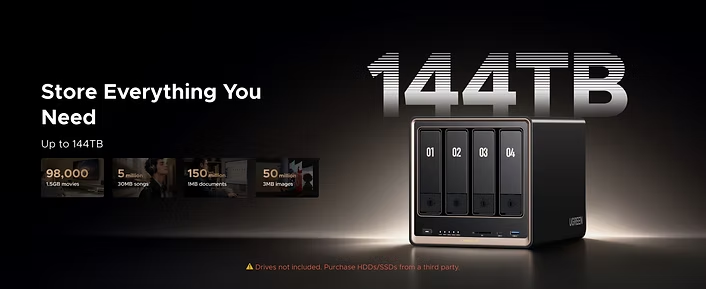
Choosing the right NAS means balancing capacity, speed, and budget. Whether for personal cloud storage, NAS backup, or professional workflows, the right network attached storage system can transform how you manage and protect your data. Explore the options, consider your priorities, and invest in a NAS that grows with your needs.

Comments